
How to find your Tribe or Player ID in ARK: Survival Evolved
Many of the admin or «cheat» commands in ARK: Survival Evolved require a PlayerID or TribeID number in order to work successfully. If you’re familiar with what your Steam64ID number is, you’ll quickly realize that the number they’re asking for IS NOT the Steam64ID, or any other ID number from Steam.
Those numbers are the UE 4 ID numbers, assigned by the game engine itself to each player or tribe. This guide will show you how to find those numbers for a tribe or player on your ARK server.
Finding the ID numbers will require the use of admin commands, so you will need to have set an Admin password on your Nodecraft server, and then enable cheats on your character.
The next section shows you how to do both things if you don’t already know how.
Setting the Admin Password
The admin password for your server can be set on the Nodecraft control panel on the «Game Settings» tab, under the «Advanced» tab.

Enter a password into the box, and then make sure to hit the save button at the bottom of the page afterwards, and then restart the server. It will not properly set the admin password unless the server is restarted afterwards.
You can also set the admin password in the «GameUserSettings.ini» config file too.
ARK Console Bar:
Connect to your ARK server. When you load into the game, hit the tab key to open the console window in game, which appears as a black bar at the very very bottom edge of the screen.
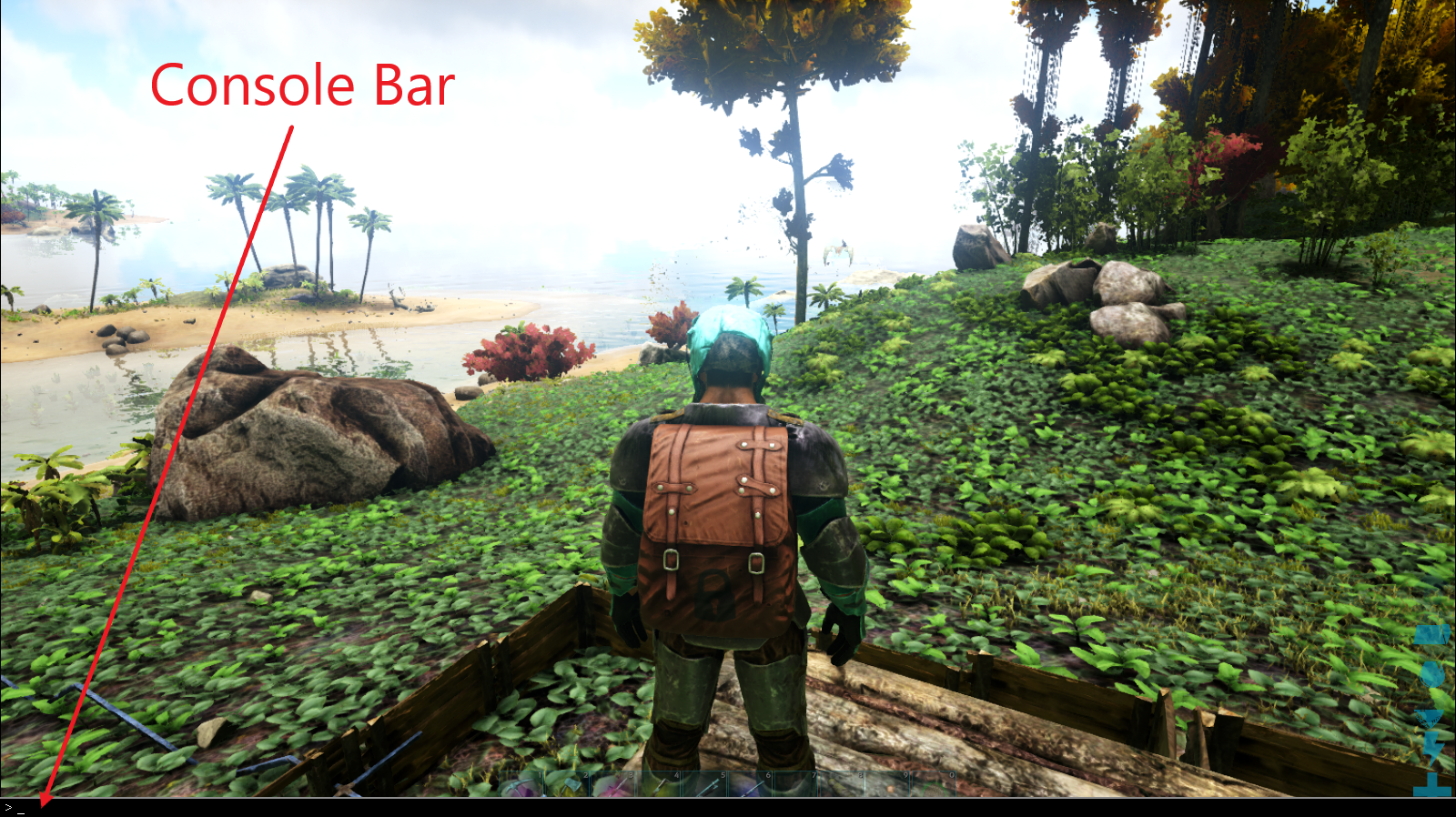
If you hit tab a second time, the entire top half of the screen will be the console window, with a black bar near the middle for entering commands, and it will show the previous commands you’ve entered on the top half of the screen.

The expanded window is very handy for realizing you made a typo entering an admin command earlier, and that is why it didn’t work.
For example, I repeatedly type «cheats» instead of «cheat» when entering commands.
cheat works.
cheats with the s on the end is wrong, and the entire command is ignored.
Hitting tab again closes the console, or hitting escape.
Enable Cheats on your Character:
Once you have the console open, enter the following command to activate «cheats» in game.
If entered correctly, you are now an admin and you can use the «cheat» commands! You normally don’t get any kind of confirmation message when admin is turned on.
If you’re not sure if it actually worked, you can test to make sure you’re an admin by hitting tab again, and typing cheat fly in the console bar. You should see a message that you «You feel much lighter», and when you hit the jump key you will rise into the air! Type cheat walk to turn off fly mode if you want afterwards.
Hovering in midair is actually a great way to not get interrupted in game while you’re entering admin/cheat commands. Pesky raptor! Stop trying to eat me while I enter admin commands! Go away! Bad raptor!
Use the SetCheatPlayer Command:
Hit tab again, and type this command (NOTE: for this command, you don’t have to type cheat or admincheat before it as you do for most cheat commands):
This turns on a special view in game that shows you a ton of information in an onscreen HUD.
To turn off the HUD, use the same command setcheatplayer but with zero or false after it.
Finding a TribeID Identifier
With the setcheatplayer HUD turned on, just look at any structure that belongs to that tribe, you will see a «Team» number towards the bottom middle of the screen.
The screen shot below was taken at night so you could see the information on the HUD better.

The «Team» number is the UE4 ID number in ark for that tribe.
Finding PlayerID Numbers:
NOTE: The letters after «tribe» in that command above are «ID» is in «identification». You can also type that whole command in lowercase by the way, the uppercase letters are not required.
This will output onto the screen the name of the tribe, and all the players that are in that tribe, and their information including their PlayerID numbers.

Now we can see the player list for that tribe, which includes the PlayerID of the «beach bob» in his underwear standing in front of my character.
Seriously man! put some clothes on! We have standards on this server! Can’t be walking around in your underwear!
Success!
List of ARK Console Commands
The entire list of ARK: Survival Evolved console commands can be found on their wiki, at https://ark.gamepedia.com/Console_Commands
Can’t find answers to your questions?
Feel free to contact our support team for personal and professional help.
Консольные команды (коды) администратора в ARK: Survival Evolved

С помощью этого руководства по консольным командам и читам в ARK: Survival Evolved вы сможете делать практически все, что вы хотите. Режим бога, бесконечные характеристики, создание предметов и призыв динозавров в любую точку карты.
Как включить команды администратора
Команды администратора и читы нужно вводить в игровую консоль. Вы можете открыть консоль ARK, нажав на клавишу TAB во время игры.
Как использовать команды в мультиплеере
Большинство команд в этом руководстве классифицируются игрой как «читы» и могут использоваться только игроками с правами администратора.

Чтобы получить привилегии администратора, вам нужно ввести в консоли «enablecheats», а затем пароль администратора сервера (например: enablecheats examplepassword69).
Но даже с правами администратора вам придется вводить в каждую команду префикс «admincheat» (например: admincheat god).
Это требуется только для многопользовательской игры. Для читов в однопользовательском режиме ARK просто введите желаемую команду без префикса «admincheat», и она будет работать.
Команды администратора и коды (читы)


Как узнать айди игрока в арк


ARK: Survival Evolved


press TAB to open the console of ARK then enter «showmyadminmanager» (without «») and press enter. This just works in singleplayer or if you have admin access on a server.
For what you need your player ID?
Did you rent a server or did you start the server on your pc?
On your pc you have to edit the AllowedCheaterSteamIDs.txt and add your steam 64 id to this file.
Your ID is: 76561198036198649
If there is a web interface you may can add your Steam 64 ID there. If you have to edit the files by your self search for AllowedCheaterSteamIDs.txt and add your ID which is 76561198036198649
You have to restart the server after this

I just made my own server with Nitrado on my PC.
I just made my own server with Nitrado on my PC.
Консольные команды в Ark: Survival Evolved
Как использовать администраторские команды консоли в Ark: Survival Evolved?
Примечание: Все еще в разработке (не все команды могут работать)
Вот как вы можете использовать их!
Войдите в свой сервер. Примечание: Запуск сервера АРК может занять 5-10 минут при первом запуске.
1) Для того, чтобы получить доступ к консоли сервера нажмите «Tab»
2) Используйте команду: enablecheats «AdminPassword». (Пример: enablecheats pass123)
3) Также введите SetCheatPlayer true в консоли, чтобы активировать читы. Для того чтоб их выключить — SetCheatPlayer false
4) Используйте чит команды!
Примечание: Они включают читы для тех, кто есть на сервере!
Команды администратора в мультиплеере ARK
| Чит команда | Описание | |
|---|---|---|
| Cheat Addexperience 500 1 1 | Дает вам 500 опыта. Можно изменить | |
| Cheat Fly | Ваш персонаж будет летать | |
| Cheat God | Вы не можете умереть | |
| Cheat Ghost | Летаете и проходите сквозь текстуры | |
| Cheat Giveresources | Дает 50 любого ресурса (Lan Servers) | |
| Cheat Walk | Вы прекращаете летать | |
| setcheatplayer true | Включает чит меню | |
| setcheatplayer false | Выключает чит меню | |
| Cheat settimeofday | Изменяет время дня | |
| Cheat ToggleInfiniteAmmo | Вкл\Выкл бесконечные патроны. | |
| Cheat Teleport | Вы телепортируетесь куда вы смотрите. | |
| Cheat saveworld | Сохраняет текущий мир. | |
| Togglegun | Вкл\Выкл видимость вашего оружия\инструмента | |
| Cheat AllowPlayerToJointNoCheck | Вайтлист для STEAMID | |
| Cheat DisallowPlayerToJoinNoCheck | Убрать STEAMID с вайтлиста | |
| Cheat Broadcast | Сообщение на весь сервер. | |
| Сheat SetMessageOfTheDay | Устанавливает сообщение дня появляющиеся когда люди присоединиться к серверу. | |
| Cheat Slomo 5 | Изменить скорость передвижения | |
| Cheat Playersonly | Замораживает всех динозавров и крафт | |
| Cheat Forcetame | Мгновенно приручить динозавра | |
| Cheat Infinitestats | Дает бесконечное сытость, выносливость, боеприпасы и т.д. | |
| BanPlayer | Забанить игрока на сервера | |
| UnBanPlayer | Разбанить игрока на сервера | |
| Cheat DamageTarget | Нанести урон цели | |
| Cheat DestroyAllEnemies | Уничтожить всех врагов | |
| Cheat Hurtme | Нанести урон себе | |
| Cheat setplayerpos 0 0 0 | Телепортироваться по координатам. >Карта координат ARK | Призвать динозавтра на ваше место |
| Сheat destroyall | Уничтожает все объекты / динозавры по имени классу | |
| Cheat giveitemnum | Дает вам любой предмет. | |
| Stat fps | Показывает свой FPS и Ping. Команда доступна любому. |
Команды администратора для Одиночной / Локальной игры в ARK
| Чит команда | Описание | |
|---|---|---|
| Addexperience 500 1 1 | Дает вам 500 опыта. Можно изменить | |
| Fly | Ваш персонаж будет летать | |
| God | Вы не можете умереть | |
| Ghost | Летаете и проходите сквозь текстуры | |
| Giveresources | Дает 50 любого ресурса (Lan Servers) | |
| Walk | Вы прекращаете летать | |
| setcheatplayer true | Включает чит меню | |
| setcheatplayer false | Выключает чит меню | |
| settimeofday | Изменяет время дня | |
| Teleport | Вы телепортируетесь куда вы смотрите. | |
| saveworld | Сохраняет текущий мир. | |
| Togglegun | Вкл\Выкл видимость вашего оружия\инструмента | |
| Slomo 5 | Изменить скорость передвижения | |
| Playersonly | Замораживает всех динозавров и крафт | |
| Forcetame | Мгновенно приручить динозавра | |
| Infinitestats | Дает бесконечное сытость, выносливость, боеприпасы и т.д. | |
| DamageTarget | Нанести урон цели | |
| DestroyAllEnemies | Уничтожить всех врагов | |
| Hurtme | Нанести урон себе | |
| setplayerpos 0 0 0 | Телепортироваться по координатам >Карта координат ARK | Призвать динозавтра на ваше место |
| destroyall | Уничтожает все объекты / динозавры по имени классу | |
| giveitemnum | Дает вам любой предмет. | |
| Stat fps | Показывает свой FPS и Ping. Команда доступна любому. |
Консольные команды запуска сервера ARK
Эти команды должны быть использованы в качестве аргументов командной строки при запуске сервера. Вы не можете активировать их в игре.
Пример: Server.exe TheIsland?listen?ServerCrosshair=true?MapPlayerLocation=true
| Команда | Описание |
|---|---|
| ServerPVE | Выключает PVP |
| ServerHardcore | После смерти вы получаете 1 уровень |
| ServerForceNoHud | Отключение плавающих имен |
| GlobalVoiceChat | Голосовой чат глобальный |
| ServerCrosshair | Включить прицел |
| ProximityChat | Текстовые сообщение видны только тем кто стоит рядом |
| NoTributeDownloads | Выключение внешнего скачивания персонажей / динозавров. |
| AllowThirdPersonPlayer | Включает режим просмотра от 3 лица. |
| AlwaysNotifyPlayerLeft | Выключает сообщения когда кто-то покидает сервер |
| AlwaysNotifyPlayerJoined | Выключает сообщения когда кто-то присоединяется в серверу |
| DontAlwaysNotifyPlayerJoined | Выключает сообщения подключения |
51 комментарий
New server commandline/INI options (GamerUserSettings.ini [ServerSettings] section or «?Option=Value» for commandline argument):
bDisableStructureDecayPvE=false
bAllowFlyerCarryPvE=false
MaxStructuresInRange=1300
Работают,извините,сам виноват.Не очень умею пользоваться консолью
А можно начать одиночку заново, если да то как?
Поставьте PIN-код на дверь (зажать Е — set PINcode). Достаточно ввести ПИН один раз и дальше дверь не будет требовать код
Он тебя должен в свое племя добавить и повысить

С помощью этого руководства по консольным командам и читам в ARK: Survival Evolved вы сможете делать практически все, что вы хотите. Режим бога, бесконечные характеристики, создание предметов и призыв динозавров в любую точку карты.
Как включить команды администратора:
Команды администратора и читы нужно вводить в игровую консоль. Вы можете открыть консоль ARK, нажав на клавишу TAB во время игры.
Как использовать команды в мультиплеере:
Большинство команд в этом руководстве классифицируются игрой как «читы» и могут использоваться только игроками с правами администратора.

Чтобы получить привилегии администратора, вам нужно ввести в консоли «enablecheats», а затем пароль администратора сервера (например: enablecheats examplepassword69).
Но даже с правами администратора вам придется вводить в каждую команду префикс «admincheat» (например: admincheat god).
Это требуется только для многопользовательской игры. Для читов в однопользовательском режиме ARK просто введите желаемую команду без префикса «admincheat», и она будет работать.
Команды администратора и коды (читы)


